
Postgresql
PostgreSQL 是一款先进的企业级开源关系型数据库系统,它同时支持 SQL(关系型)和 JSON(非关系型)查询。PostgreSQL 由开源社区经过二十多年的持续开发与完善,具备极高的稳定性,被广泛应用于众多网络应用、移动应用及分析应用,并常被选作核心数据库。
PostgreSQL历史
PostgreSQL项目始于1986年,诞生于加州大学伯克利分校计算机科学系。该项目最初命名为POSTGRES,名称源于伯克利同期开发的早期Ingres数据库。POSTGRES项目的核心目标是增加支持多种数据类型所需的基础功能。
1996年,为明确体现对SQL语言的支持,POSTGRES正式更名为PostgreSQL。如今PostgreSQL通常被简称为Postgres。
自那时起,由全球贡献者组成的PostgreSQL全球开发组持续维护着这个开源免费数据库项目的版本迭代。PostgreSQL最初专为类UNIX平台设计,随后逐步扩展至Windows、macOS和Solaris等多种操作系统平台。
PostgreSQL 功能亮点
PostgreSQL 拥有许多其他企业级数据库管理系统所具备的高级特性,例如:
• 用户自定义类型
• 表继承
• 复杂的锁定机制
• 外键参照完整性
• 视图、规则、子查询
• 嵌套事务(保存点)
• 多版本并发控制(MVCC)
• 异步复制
近期版本的 PostgreSQL 还支持以下特性:
• 原生 Microsoft Windows Server 版本
• 表空间
• 时间点恢复
且每个新版本都会加入更多新功能。
PostgreSQL 的设计注重可扩展性。它允许您自定义数据类型、索引类型、函数语言等。
如果您对系统中的任何部分不满意,您始终可以开发自定义插件来增强其功能,以满足您的需求,例如添加新的优化器。
安装
地址
https://www.postgresql.org/download/linux/redhat/
sudo yum install -y https://download.postgresql.org/pub/repos/yum/reporpms/EL-7-x86_64/pgdg-redhat-repo-latest.noarch.rpm
sudo yum install -y postgresql17-server
sudo /usr/pgsql-17/bin/postgresql-17-setup initdb
sudo systemctl enable postgresql-17
sudo systemctl start postgresql-17
好的,在 CentOS 8 上安装 PostgreSQL 有几种方法。由于 CentOS 8 的生命周期已结束,官方仓库可能不可用,因此推荐使用 PostgreSQL 官方仓库来安装最新版本。
以下是两种主要方法,强烈推荐方法一。
方法一:使用 PostgreSQL 官方仓库(推荐)
这种方法可以安装最新或特定版本的 PostgreSQL,并能方便地接收更新。
步骤 1:安装 RPM 仓库
首先,需要安装 PostgreSQL 的官方 RPM 仓库包。
- 安装
dnf工具(如果尚未安装):
sudo dnf install -y dnf-plugins-core
- 下载并安装 PostgreSQL 仓库 RPM:
访问 PostgreSQL 官方下载页面,
找到适用于 RHEL 8 的仓库 RPM 链接。以 PostgreSQL 16 为例:
sudo dnf install -y https://download.postgresql.org/pub/repos/yum/reporpms/EL-8-x86_64/pgdg-redhat-repo-latest.noarch.rpm
    ```

*注意:如果链接失效,请从官网获取最新链接。*

3.  **禁用 CentOS 默认的 PostgreSQL 模块**(非常重要!):

为了避免与官方仓库冲突,需要禁用默认的流模块。

```bash
sudo dnf -qy module disable postgresql
步骤 2:安装 PostgreSQL
- 列出可用的 PostgreSQL 版本:
dnf list postgresql*
这会显示所有可用的版本(如 postgresql15, postgresql16-server 等)。
- 安装 PostgreSQL 服务器、客户端和贡献包:
假设我们要安装 PostgreSQL 16。
sudo dnf install -y postgresql16-server postgresql16-contrib
postgresql16-server:包含数据库服务端。postgresql16-contrib:包含额外的有用功能模块。
步骤 3:初始化数据库
- 初始化数据库集群:
sudo /usr/pgsql-16/bin/postgresql-16-setup initdb
注意:路径中的 16 需要替换为您安装的实际版本号。
步骤 4:启动并启用服务
- 启动 PostgreSQL 服务:
sudo systemctl start postgresql-16
- 设置 PostgreSQL 服务开机自启:
sudo systemctl enable postgresql-16
- 检查服务状态:
sudo systemctl status postgresql-16
如果一切正常,您应该看到 active (running) 的状态。
步骤 5:基本配置和连接
- 切换到
postgres系统用户:
PostgreSQL 安装后会创建一个名为 postgres 的系统用户。
sudo -i -u postgres
- 连接到 PostgreSQL:
现在您已经是postgres用户,可以访问数据库命令行。
psql
或者,不切换用户,直接连接:
sudo -u postgres psql
- (可选)修改
postgres用户密码:
在 psql 提示符下,执行:
\password postgres
然后输入新密码。
- (可选)配置远程访问(如果需要):
- 编辑
pg_hba.conf文件,通常位于/var/lib/pgsql/16/data/pg_hba.conf。 - 编辑
postgresql.conf文件,通常位于/var/lib/pgsql/16/data/postgresql.conf,将listen_addresses设置为'*'或特定 IP。
- cd /var/lib/pgsql/16/data
- vi pg_hba.conf
host all all 0.0.0.0/0 md5
- vi postgresql.conf
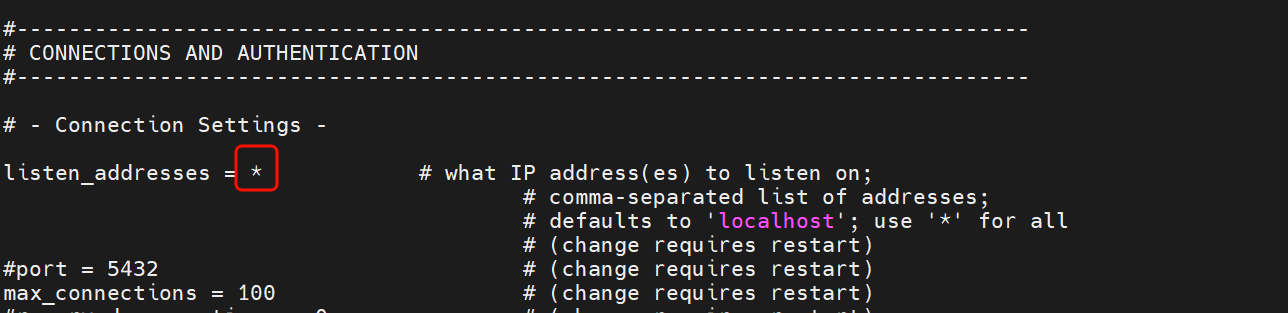
- 修改配置后,必须重启服务:
sudo systemctl restart postgresql-16
- 确保防火墙开放 5432 端口:
- 关闭防火墙
systemctl stop firewalld
- 或者打开端口
sudo firewall-cmd --permanent --add-port=5432/tcp
sudo firewall-cmd --reload
方法二: 直接yum的repo仓库文件
#######################################################
# PGDG Red Hat Enterprise Linux / Rocky repositories  #
#######################################################

# PGDG Red Hat Enterprise Linux / Rocky stable common repository for all PostgreSQL versions

[pgdg-common]
name=PostgreSQL common RPMs for RHEL / Rocky / AlmaLinux $releasever - $basearch
baseurl=https://download.postgresql.org/pub/repos/yum/common/redhat/rhel-$releasever-$basearch
enabled=1
gpgcheck=1
gpgkey=file:///etc/pki/rpm-gpg/PGDG-RPM-GPG-KEY-RHEL
repo_gpgcheck = 1

# Red Hat recently breaks compatibility between 8.n and 8.n+1. PGDG repo is
# affected with the LLVM packages. This is a band aid repo for the llvmjit users
# whose installations cannot be updated.

[pgdg-centos8-sysupdates]
name=PostgreSQL Supplementary ucommon RPMs for RHEL / Rocky / AlmaLinux $releasever - $basearch
baseurl=https://download.postgresql.org/pub/repos/yum/common/pgdg-centos8-sysupdates/redhat/rhel-$releasever-$basearch
enabled=0
gpgcheck=1
gpgkey=file:///etc/pki/rpm-gpg/PGDG-RPM-GPG-KEY-RHEL
repo_gpgcheck = 1

# We provide extra package to support some RPMs in the PostgreSQL RPM repo, like
# consul, haproxy, etc.

[pgdg-rhel8-extras]
name=Extra packages to support some RPMs in the PostgreSQL RPM repo RHEL / Rocky / AlmaLinux $releasever - $basearch
baseurl=https://download.postgresql.org/pub/repos/yum/common/pgdg-rhel$releasever-extras/redhat/rhel-$releasever-$basearch
enabled=0
gpgcheck=1
gpgkey=file:///etc/pki/rpm-gpg/PGDG-RPM-GPG-KEY-RHEL
repo_gpgcheck = 1

# PGDG Red Hat Enterprise Linux / Rocky stable repositories:

[pgdg18]
name=PostgreSQL 18 for RHEL / Rocky / AlmaLinux $releasever - $basearch
baseurl=https://download.postgresql.org/pub/repos/yum/18/redhat/rhel-$releasever-$basearch
enabled=1
gpgcheck=1
gpgkey=file:///etc/pki/rpm-gpg/PGDG-RPM-GPG-KEY-RHEL
repo_gpgcheck = 1

[pgdg17]
name=PostgreSQL 17 for RHEL / Rocky / AlmaLinux $releasever - $basearch
baseurl=https://download.postgresql.org/pub/repos/yum/17/redhat/rhel-$releasever-$basearch
enabled=1
gpgcheck=1
gpgkey=file:///etc/pki/rpm-gpg/PGDG-RPM-GPG-KEY-RHEL
repo_gpgcheck = 1

[pgdg16]
name=PostgreSQL 16 for RHEL / Rocky / AlmaLinux $releasever - $basearch
baseurl=https://download.postgresql.org/pub/repos/yum/16/redhat/rhel-$releasever-$basearch
enabled=1
gpgcheck=1
gpgkey=file:///etc/pki/rpm-gpg/PGDG-RPM-GPG-KEY-RHEL
repo_gpgcheck = 1

[pgdg15]
name=PostgreSQL 15 for RHEL / Rocky / AlmaLinux $releasever - $basearch
baseurl=https://download.postgresql.org/pub/repos/yum/15/redhat/rhel-$releasever-$basearch
enabled=1
gpgcheck=1
gpgkey=file:///etc/pki/rpm-gpg/PGDG-RPM-GPG-KEY-RHEL
repo_gpgcheck = 1

[pgdg14]
name=PostgreSQL 14 for RHEL / Rocky / AlmaLinux $releasever - $basearch
baseurl=https://download.postgresql.org/pub/repos/yum/14/redhat/rhel-$releasever-$basearch
enabled=1
gpgcheck=1
gpgkey=file:///etc/pki/rpm-gpg/PGDG-RPM-GPG-KEY-RHEL
repo_gpgcheck = 1

[pgdg13]
name=PostgreSQL 13 for RHEL / Rocky / AlmaLinux $releasever - $basearch
baseurl=https://download.postgresql.org/pub/repos/yum/13/redhat/rhel-$releasever-$basearch
enabled=1
gpgcheck=1
gpgkey=file:///etc/pki/rpm-gpg/PGDG-RPM-GPG-KEY-RHEL
repo_gpgcheck = 1

# PGDG RHEL / Rocky / AlmaLinux Updates Testing common repository.

[pgdg-common-testing]
name=PostgreSQL common testing RPMs for RHEL / Rocky / AlmaLinux $releasever - $basearch
baseurl=https://download.postgresql.org/pub/repos/yum/testing/common/redhat/rhel-$releasever-$basearch
enabled=0
gpgcheck=1
gpgkey=file:///etc/pki/rpm-gpg/PGDG-RPM-GPG-KEY-RHEL
repo_gpgcheck = 1

# PGDG RHEL / Rocky / AlmaLinux Updates Testing repositories. (These packages should not be used in production)
# Available for PostgreSQL 13 and above.

[pgdg18-updates-testing]
name=PostgreSQL 18 for RHEL / Rocky / AlmaLinux $releasever - $basearch - Updates testing
baseurl=https://download.postgresql.org/pub/repos/yum/testing/18/redhat/rhel-$releasever-$basearch
enabled=0
gpgcheck=1
gpgkey=file:///etc/pki/rpm-gpg/PGDG-RPM-GPG-KEY-RHEL
repo_gpgcheck = 1

[pgdg17-updates-testing]
name=PostgreSQL 17 for RHEL / Rocky / AlmaLinux $releasever - $basearch - Updates testing
baseurl=https://download.postgresql.org/pub/repos/yum/testing/17/redhat/rhel-$releasever-$basearch
enabled=0
gpgcheck=1
gpgkey=file:///etc/pki/rpm-gpg/PGDG-RPM-GPG-KEY-RHEL
repo_gpgcheck = 1

[pgdg16-updates-testing]
name=PostgreSQL 16 for RHEL / Rocky / AlmaLinux $releasever - $basearch - Updates testing
baseurl=https://download.postgresql.org/pub/repos/yum/testing/16/redhat/rhel-$releasever-$basearch
enabled=0
gpgcheck=1
gpgkey=file:///etc/pki/rpm-gpg/PGDG-RPM-GPG-KEY-RHEL
repo_gpgcheck = 1

[pgdg15-updates-testing]
name=PostgreSQL 15 for RHEL / Rocky / AlmaLinux $releasever - $basearch - Updates testing
baseurl=https://download.postgresql.org/pub/repos/yum/testing/15/redhat/rhel-$releasever-$basearch
enabled=0
gpgcheck=1
gpgkey=file:///etc/pki/rpm-gpg/PGDG-RPM-GPG-KEY-RHEL
repo_gpgcheck = 1

[pgdg14-updates-testing]
name=PostgreSQL 14 for RHEL / Rocky / AlmaLinux $releasever - $basearch - Updates testing
baseurl=https://download.postgresql.org/pub/repos/yum/testing/14/redhat/rhel-$releasever-$basearch
enabled=0
gpgcheck=1
gpgkey=file:///etc/pki/rpm-gpg/PGDG-RPM-GPG-KEY-RHEL
repo_gpgcheck = 1

[pgdg13-updates-testing]
name=PostgreSQL 13 for RHEL / Rocky / AlmaLinux $releasever - $basearch - Updates testing
baseurl=https://download.postgresql.org/pub/repos/yum/testing/13/redhat/rhel-$releasever-$basearch
enabled=0
gpgcheck=1
gpgkey=file:///etc/pki/rpm-gpg/PGDG-RPM-GPG-KEY-RHEL
repo_gpgcheck = 1

# PGDG Red Hat Enterprise Linux / Rocky SRPM testing common repository

[pgdg-common-source]
name=PostgreSQL common for RHEL / Rocky / AlmaLinux $releasever - $basearch - Source
baseurl=https://dnf-srpms.postgresql.org/srpms/common/redhat/rhel-$releasever-$basearch
enabled=0
gpgcheck=1
gpgkey=file:///etc/pki/rpm-gpg/PGDG-RPM-GPG-KEY-RHEL
repo_gpgcheck = 1

# PGDG RHEL / Rocky / AlmaLinux Extras SRPM repository

[pgdg-rhel8-extras-source]
name=SRPMs of the Extras packages to support some RPMs in the PostgreSQL RPM repo RHEL / Rocky / AlmaLinux $releasever - $basearch
baseurl=https://download.postgresql.org/pub/repos/yum/srpms/common/pgdg-rhel$releasever-extras/redhat/rhel-$releasever-$basearch
enabled=0
gpgcheck=1
gpgkey=file:///etc/pki/rpm-gpg/PGDG-RPM-GPG-KEY-RHEL
repo_gpgcheck = 1

# PGDG RHEL / Rocky / AlmaLinux testing common SRPM repository for all PostgreSQL versions

[pgdg-common-testing-source]
name=PostgreSQL common testing SRPMs for RHEL / Rocky / AlmaLinux $releasever - $basearch
baseurl=https://dnf-srpms.postgresql.org/srpms/testing/common/redhat/rhel-$releasever-$basearch
enabled=0
gpgcheck=1
gpgkey=file:///etc/pki/rpm-gpg/PGDG-RPM-GPG-KEY-RHEL
repo_gpgcheck = 1

# PGDG RHEL / Rocky / AlmaLinux Extras Testing SRPM repository

[pgdg-rhel8-extras-testing-source]
name=SRPMs of the Extras packages to support some RPMs in the PostgreSQL RPM repo RHEL / Rocky / AlmaLinux $releasever - $basearch
baseurl=https://download.postgresql.org/pub/repos/yum/srpms/testing/common/pgdg-rhel$releasever-extras/redhat/rhel-$releasever-$basearch
enabled=0
gpgcheck=1
gpgkey=file:///etc/pki/rpm-gpg/PGDG-RPM-GPG-KEY-RHEL
repo_gpgcheck = 1

# PGDG Source RPMs (SRPM), and their testing repositories:

[pgdg18-source]
name=PostgreSQL 18 for RHEL / Rocky / AlmaLinux $releasever - $basearch - Source
baseurl=https://dnf-srpms.postgresql.org/srpms/18/redhat/rhel-$releasever-$basearch
enabled=0
gpgcheck=1
gpgkey=file:///etc/pki/rpm-gpg/PGDG-RPM-GPG-KEY-RHEL
repo_gpgcheck = 1

[pgdg18-updates-testing-source]
name=PostgreSQL 18 for RHEL / Rocky / AlmaLinux $releasever - $basearch - Source updates testing
baseurl=https://dnf-srpms.postgresql.org/srpms/testing/18/redhat/rhel-$releasever-$basearch
enabled=0
gpgcheck=1
gpgkey=file:///etc/pki/rpm-gpg/PGDG-RPM-GPG-KEY-RHEL
repo_gpgcheck = 1

[pgdg17-source]
name=PostgreSQL 17 for RHEL / Rocky / AlmaLinux $releasever - $basearch - Source
baseurl=https://dnf-srpms.postgresql.org/srpms/17/redhat/rhel-$releasever-$basearch
enabled=0
gpgcheck=1
gpgkey=file:///etc/pki/rpm-gpg/PGDG-RPM-GPG-KEY-RHEL
repo_gpgcheck = 1

[pgdg17-updates-testing-source]
name=PostgreSQL 17 for RHEL / Rocky / AlmaLinux $releasever - $basearch - Source updates testing
baseurl=https://dnf-srpms.postgresql.org/srpms/testing/17/redhat/rhel-$releasever-$basearch
enabled=0
gpgcheck=0
gpgkey=file:///etc/pki/rpm-gpg/PGDG-RPM-GPG-KEY-RHEL
repo_gpgcheck = 1

[pgdg16-source]
name=PostgreSQL 16 for RHEL / Rocky / AlmaLinux $releasever - $basearch - Source
baseurl=https://dnf-srpms.postgresql.org/srpms/16/redhat/rhel-$releasever-$basearch
enabled=0
gpgcheck=1
gpgkey=file:///etc/pki/rpm-gpg/PGDG-RPM-GPG-KEY-RHEL
repo_gpgcheck = 1

[pgdg16-updates-testing-source]
name=PostgreSQL 16 for RHEL / Rocky / AlmaLinux $releasever - $basearch - Source updates testing
baseurl=https://dnf-srpms.postgresql.org/srpms/testing/16/redhat/rhel-$releasever-$basearch
enabled=0
gpgcheck=1
gpgkey=file:///etc/pki/rpm-gpg/PGDG-RPM-GPG-KEY-RHEL
repo_gpgcheck = 1

[pgdg15-source]
name=PostgreSQL 15 for RHEL / Rocky / AlmaLinux $releasever - $basearch - Source
baseurl=https://dnf-srpms.postgresql.org/srpms/15/redhat/rhel-$releasever-$basearch
enabled=0
gpgcheck=1
gpgkey=file:///etc/pki/rpm-gpg/PGDG-RPM-GPG-KEY-RHEL
repo_gpgcheck = 1

[pgdg15-updates-testing-source]
name=PostgreSQL 15 for RHEL / Rocky / AlmaLinux $releasever - $basearch - Source updates testing
baseurl=https://dnf-srpms.postgresql.org/srpms/testing/15/redhat/rhel-$releasever-$basearch
enabled=0
gpgcheck=1
gpgkey=file:///etc/pki/rpm-gpg/PGDG-RPM-GPG-KEY-RHEL
repo_gpgcheck = 1

[pgdg14-source]
name=PostgreSQL 14 for RHEL / Rocky / AlmaLinux $releasever - $basearch - Source
baseurl=https://dnf-srpms.postgresql.org/srpms/14/redhat/rhel-$releasever-$basearch
enabled=0
gpgcheck=1
gpgkey=file:///etc/pki/rpm-gpg/PGDG-RPM-GPG-KEY-RHEL
repo_gpgcheck = 1

[pgdg14-updates-testing-source]
name=PostgreSQL 14 for RHEL / Rocky / AlmaLinux $releasever - $basearch - Source updates testing
baseurl=https://dnf-srpms.postgresql.org/srpms/testing/14/redhat/rhel-$releasever-$basearch
enabled=0
gpgcheck=1
gpgkey=file:///etc/pki/rpm-gpg/PGDG-RPM-GPG-KEY-RHEL
repo_gpgcheck = 1

[pgdg13-source]
name=PostgreSQL 13 for RHEL / Rocky / AlmaLinux $releasever - $basearch - Source
baseurl=https://dnf-srpms.postgresql.org/srpms/13/redhat/rhel-$releasever-$basearch
enabled=0
gpgcheck=1
gpgkey=file:///etc/pki/rpm-gpg/PGDG-RPM-GPG-KEY-RHEL
repo_gpgcheck = 1

[pgdg13-updates-testing-source]
name=PostgreSQL 13 for RHEL / Rocky / AlmaLinux $releasever - $basearch - Source updates testing
baseurl=https://dnf-srpms.postgresql.org/srpms/testing/13/redhat/rhel-$releasever-$basearch
enabled=0
gpgcheck=1
gpgkey=file:///etc/pki/rpm-gpg/PGDG-RPM-GPG-KEY-RHEL
repo_gpgcheck = 1

# Debuginfo/debugsource repositories for the common repo

[pgdg-common-debuginfo]
name=PostgreSQL common RPMs for RHEL / Rocky / AlmaLinux $releasever - $basearch - Debuginfo
baseurl=https://dnf-debuginfo.postgresql.org/debug/common/redhat/rhel-$releasever-$basearch
enabled=0
gpgcheck=1
gpgkey=file:///etc/pki/rpm-gpg/PGDG-RPM-GPG-KEY-RHEL
repo_gpgcheck = 1

# Debuginfo/debugsource packages for stable repos

[pgdg18-debuginfo]
name=PostgreSQL 18 for RHEL / Rocky / AlmaLinux $releasever - $basearch - Debuginfo
baseurl=https://dnf-debuginfo.postgresql.org/debug/18/redhat/rhel-$releasever-$basearch
enabled=0
gpgcheck=1
gpgkey=file:///etc/pki/rpm-gpg/PGDG-RPM-GPG-KEY-RHEL
repo_gpgcheck = 1

[pgdg17-debuginfo]
name=PostgreSQL 17 for RHEL / Rocky / AlmaLinux $releasever - $basearch - Debuginfo
baseurl=https://dnf-debuginfo.postgresql.org/debug/17/redhat/rhel-$releasever-$basearch
enabled=0
gpgcheck=1
gpgkey=file:///etc/pki/rpm-gpg/PGDG-RPM-GPG-KEY-RHEL
repo_gpgcheck = 1

[pgdg16-debuginfo]
name=PostgreSQL 16 for RHEL / Rocky / AlmaLinux $releasever - $basearch - Debuginfo
baseurl=https://dnf-debuginfo.postgresql.org/debug/16/redhat/rhel-$releasever-$basearch
enabled=0
gpgcheck=1
gpgkey=file:///etc/pki/rpm-gpg/PGDG-RPM-GPG-KEY-RHEL
repo_gpgcheck = 1

[pgdg15-debuginfo]
name=PostgreSQL 15 for RHEL / Rocky / AlmaLinux $releasever - $basearch - Debuginfo
baseurl=https://dnf-debuginfo.postgresql.org/debug/15/redhat/rhel-$releasever-$basearch
enabled=0
gpgcheck=1
gpgkey=file:///etc/pki/rpm-gpg/PGDG-RPM-GPG-KEY-RHEL
repo_gpgcheck = 1

[pgdg14-debuginfo]
name=PostgreSQL 14 for RHEL / Rocky / AlmaLinux $releasever - $basearch - Debuginfo
baseurl=https://dnf-debuginfo.postgresql.org/debug/14/redhat/rhel-$releasever-$basearch
enabled=0
gpgcheck=1
gpgkey=file:///etc/pki/rpm-gpg/PGDG-RPM-GPG-KEY-RHEL
repo_gpgcheck = 1

[pgdg13-debuginfo]
name=PostgreSQL 13 for RHEL / Rocky / AlmaLinux $releasever - $basearch - Debuginfo
baseurl=https://dnf-debuginfo.postgresql.org/debug/13/redhat/rhel-$releasever-$basearch
enabled=0
gpgcheck=1
gpgkey=file:///etc/pki/rpm-gpg/PGDG-RPM-GPG-KEY-RHEL
repo_gpgcheck = 1

# Debuginfo/debugsource packages for testing repos
# Available for PostgreSQL 13 and above.

[pgdg18-updates-testing-debuginfo]
name=PostgreSQL 18 for RHEL / Rocky / AlmaLinux $releasever - $basearch - Debuginfo
baseurl=https://dnf-debuginfo.postgresql.org/testing/debug/18/redhat/rhel-$releasever-$basearch
enabled=0
gpgcheck=1
gpgkey=file:///etc/pki/rpm-gpg/PGDG-RPM-GPG-KEY-RHEL
repo_gpgcheck = 1

[pgdg17-updates-testing-debuginfo]
name=PostgreSQL 17 for RHEL / Rocky / AlmaLinux $releasever - $basearch - Debuginfo
baseurl=https://dnf-debuginfo.postgresql.org/testing/debug/17/redhat/rhel-$releasever-$basearch
enabled=0
gpgcheck=1
gpgkey=file:///etc/pki/rpm-gpg/PGDG-RPM-GPG-KEY-RHEL
repo_gpgcheck = 1

[pgdg16-updates-testing-debuginfo]
name=PostgreSQL 16 for RHEL / Rocky / AlmaLinux $releasever - $basearch - Debuginfo
baseurl=https://dnf-debuginfo.postgresql.org/testing/debug/16/redhat/rhel-$releasever-$basearch
enabled=0
gpgcheck=1
gpgkey=file:///etc/pki/rpm-gpg/PGDG-RPM-GPG-KEY-RHEL
repo_gpgcheck = 1

[pgdg15-updates-testing-debuginfo]
name=PostgreSQL 15 for RHEL / Rocky / AlmaLinux $releasever - $basearch - Debuginfo
baseurl=https://dnf-debuginfo.postgresql.org/testing/debug/15/redhat/rhel-$releasever-$basearch
enabled=0
gpgcheck=1
gpgkey=file:///etc/pki/rpm-gpg/PGDG-RPM-GPG-KEY-RHEL
repo_gpgcheck = 1

[pgdg14-updates-testing-debuginfo]
name=PostgreSQL 14 for RHEL / Rocky / AlmaLinux $releasever - $basearch - Debuginfo
baseurl=https://dnf-debuginfo.postgresql.org/testing/debug/14/redhat/rhel-$releasever-$basearch
enabled=0
gpgcheck=1
gpgkey=file:///etc/pki/rpm-gpg/PGDG-RPM-GPG-KEY-RHEL
repo_gpgcheck = 1

[pgdg13-updates-testing-debuginfo]
name=PostgreSQL 13 for RHEL / Rocky / AlmaLinux $releasever - $basearch - Debuginfo
baseurl=https://dnf-debuginfo.postgresql.org/testing/debug/13/redhat/rhel-$releasever-$basearch
enabled=0
gpgcheck=1
gpgkey=file:///etc/pki/rpm-gpg/PGDG-RPM-GPG-KEY-RHEL
repo_gpgcheck = 1
- 当我们是数据库的创建者,我们将会有一个postgres的用户,作为安装postgresql的默认用户,可以使用它进行登录
- postgres
- sudo -i -u postgress
- psql 可以直接登录数据库
# 进入默认用户,使用postgres用户创建数据库
createdb mydb  #必须使用默认用户登录操作,否则报错
# 进入数据库
psql mydb

# 删除数据
dropdb mydb
日志
- 文件位置:/var/lib/pgsql/16/data/postgresql.conf
#------------------------------------------------------------------------------
# REPORTING AND LOGGING
#------------------------------------------------------------------------------

# - Where to Log -

log_destination = 'stderr'              # Valid values are combinations of
                                        # stderr, csvlog, jsonlog, syslog, and
                                        # eventlog, depending on platform.
                                        # csvlog and jsonlog require
                                        # logging_collector to be on.

# This is used when logging to stderr:
logging_collector = on                  # Enable capturing of stderr, jsonlog,
                                        # and csvlog into log files. Required
                                        # to be on for csvlogs and jsonlogs.
                                        # (change requires restart)

# These are only used if logging_collector is on:
log_directory = 'log'                   # directory where log files are written,
                                        # can be absolute or relative to PGDATA
log_filename = 'postgresql-%a.log'      # log file name pattern,
                                        # can include strftime() escapes
#log_file_mode = 0600                   # creation mode for log files,
                                        # begin with 0 to use octal notation
log_rotation_age = 1d                   # Automatic rotation of logfiles will
                                        # happen after that time.  0 disables.
log_rotation_size = 0                   # Automatic rotation of logfiles will
                                        # happen after that much log output.
                                        # 0 disables.
log_truncate_on_rotation = on           # If on, an existing log file with the
                                        # same name as the new log file will be
                                        # truncated rather than appended to.
                                        # But such truncation only occurs on
                                        # time-driven rotation, not on restarts
                                        # or size-driven rotation.  Default is
                                        # off, meaning append to existing files
                                        # in all cases.

# These are relevant when logging to syslog:
#syslog_facility = 'LOCAL0'
#syslog_ident = 'postgres'
#syslog_sequence_numbers = on
#syslog_split_messages = on

# This is only relevant when logging to eventlog (Windows):
# (change requires restart)
#event_source = 'PostgreSQL'

# - When to Log -

#log_min_messages = warning             # values in order of decreasing detail:
                                        #   debug5
                                        #   debug4
                                        #   debug3
                                        #   debug2
                                        #   debug1
                                        #   info
                                        #   notice
                                        #   warning
                                        #   error
                                        #   log
                                        #   fatal
                                        #   panic

#log_min_error_statement = error        # values in order of decreasing detail:
                                        #   debug5
                                        #   debug4
                                        #   debug3
                                        #   debug2
                                        #   debug1
                                        #   info
                                        #   notice
                                        #   warning
                                        #   error
                                        #   log
                                        #   fatal
                                        #   panic (effectively off)

#log_min_duration_statement = -1        # -1 is disabled, 0 logs all statements
                                        # and their durations, > 0 logs only
                                        # statements running at least this number
                                        # of milliseconds

#log_min_duration_sample = -1           # -1 is disabled, 0 logs a sample of statements
                                        # and their durations, > 0 logs only a sample of
                                        # statements running at least this number
                                        # of milliseconds;
                                        # sample fraction is determined by log_statement_sample_rate

#log_statement_sample_rate = 1.0        # fraction of logged statements exceeding
                                        # log_min_duration_sample to be logged;
                                        # 1.0 logs all such statements, 0.0 never logs


#log_transaction_sample_rate = 0.0      # fraction of transactions whose statements
                                        # are logged regardless of their duration; 1.0 logs all
                                        # statements from all transactions, 0.0 never logs

#log_startup_progress_interval = 10s    # Time between progress updates for
                                        # long-running startup operations.
                                        # 0 disables the feature, > 0 indicates
                                        # the interval in milliseconds.

# - What to Log -

#debug_print_parse = off
#debug_print_rewritten = off
#debug_print_plan = off
#debug_pretty_print = on
#log_autovacuum_min_duration = 10min    # log autovacuum activity;
                                        # -1 disables, 0 logs all actions and
                                        # their durations, > 0 logs only
                                        # actions running at least this number
                                        # of milliseconds.
#log_checkpoints = on
#log_connections = off
#log_disconnections = off
#log_duration = off
#log_error_verbosity = default          # terse, default, or verbose messages
#log_hostname = off
log_line_prefix = '%m [%p] '            # special values:
                                        #   %a = application name
                                        #   %u = user name
                                        #   %d = database name
                                        #   %r = remote host and port
                                        #   %h = remote host
                                        #   %b = backend type
                                        #   %p = process ID
                                        #   %P = process ID of parallel group leader
                                        #   %t = timestamp without milliseconds
                                        #   %m = timestamp with milliseconds
                                        #   %n = timestamp with milliseconds (as a Unix epoch)
                                        #   %Q = query ID (0 if none or not computed)
                                        #   %i = command tag
                                        #   %e = SQL state
                                        #   %c = session ID
                                        #   %l = session line number
                                        #   %s = session start timestamp
                                        #   %v = virtual transaction ID
                                        #   %x = transaction ID (0 if none)
                                        #   %q = stop here in non-session
                                        #        processes
                                        #   %% = '%'
                                        # e.g. '<%u%%%d> '
#log_lock_waits = off                   # log lock waits >= deadlock_timeout
#log_recovery_conflict_waits = off      # log standby recovery conflict waits
                                        # >= deadlock_timeout
#log_parameter_max_length = -1          # when logging statements, limit logged
                                        # bind-parameter values to N bytes;
                                        # -1 means print in full, 0 disables
#log_parameter_max_length_on_error = 0  # when logging an error, limit logged
                                        # bind-parameter values to N bytes;
                                        # -1 means print in full, 0 disables
#log_statement = 'none'                 # none, ddl, mod, all
#log_replication_commands = off
#log_temp_files = -1                    # log temporary files equal or larger
                                        # than the specified size in kilobytes;
                                        # -1 disables, 0 logs all temp files
log_timezone = 'America/Los_Angeles'

# - Process Title -

#cluster_name = ''                      # added to process titles if nonempty
                                        # (change requires restart)
#update_process_title = on